This blog explains WCAG guidelines, how they are categorized, and how to implement them on your website.
Have you seen a visually appealing website that is difficult to navigate? We've all been there! Sometimes, the text is too small, sometimes the alignment is incorrect, and moreover, there is no way to zoom in or fix these issues.
Websites aren’t always built with everyone in mind. Sometimes, they have a particular clientele in mind. But a user, regardless of their abilities, should be able to access the website. This is where WCAG guidelines come into the picture.
WCAG, or Web Content Accessibility Guidelines, tells website developers how to make their websites accessible to everyone.
These guidelines ensure websites are accessible to everyone, regardless of their abilities.
This blog will explain why these guidelines are important and how they make your browsing experience more seamless than ever!
WCAG Guidelines help you create an inclusive experience for everyone. They are a set of instructions that guide you in creating one. This includes people who might be blind, deaf, have learning difficulties, or use screen readers.
By following these guidelines, you can ensure your website is perceivable, operable, and understandable to everyone.
People with impairments can easily read, hear, or feel your website’s content. This ensures a smooth and robust browsing experience for everyone.
Implementing these guidelines will help you reach a wider audience. It means more people can see your content and enjoy what you offer!
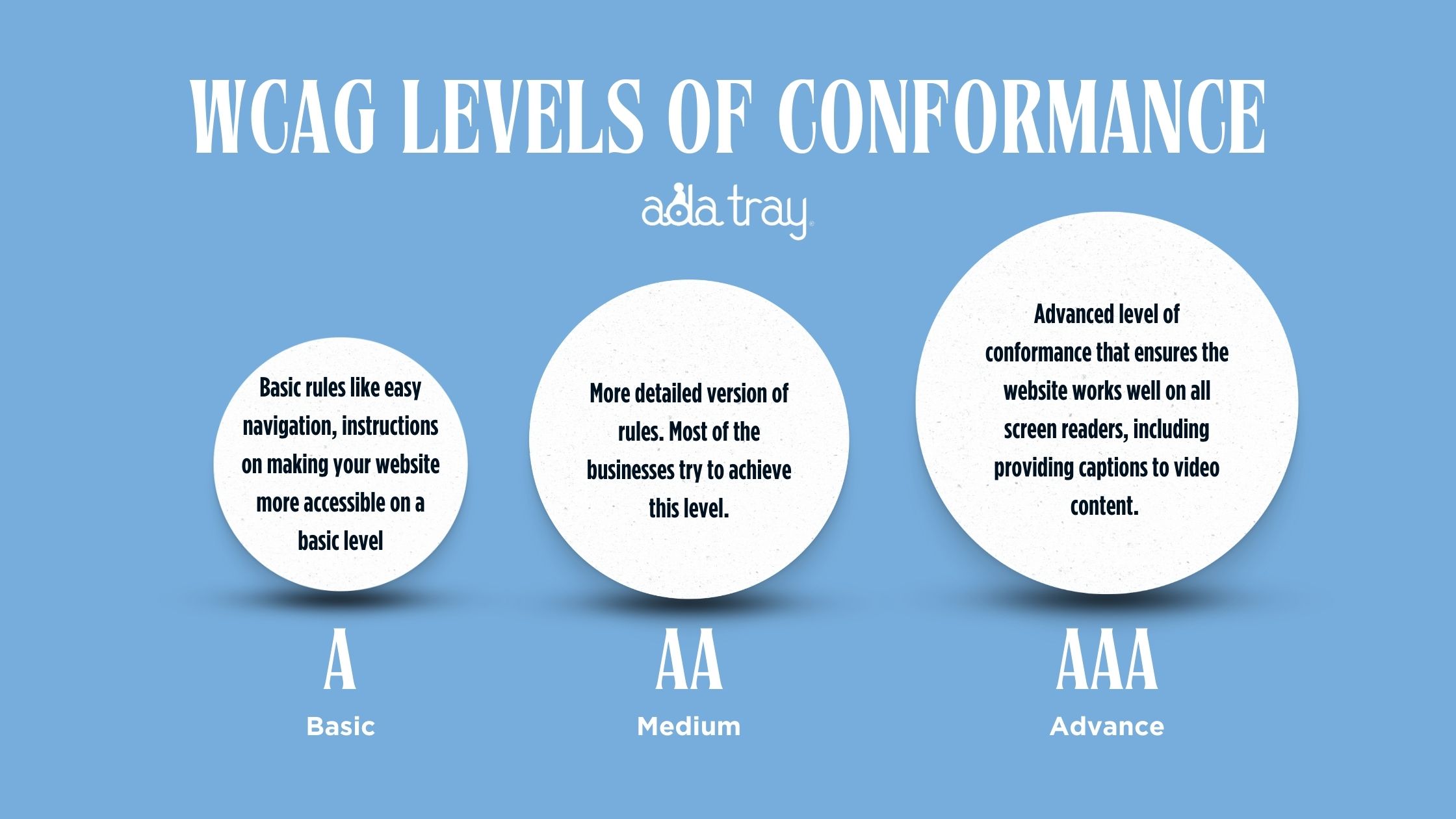
Each level builds on the preceding one. For example, if your website reaches level AA, then it is already following all the rules of level A.
Level A is a very basic set of guidelines. Basic rules like easy navigation, more accessible instructions on the website, etc.
For example-> giving clear instructions like “click on the red button” rather than just placing a red button on the website.
Level AA is more advanced than level A. Most of the organizations try to conform to level AA. This is the most common level that many organizations aim for.
Level AAA is the expert level. Its guidelines have everything from level A to AA. It includes ensuring the website works perfectly with screen readers or even providing captions for videos with no sound.
It is great if your website conforms to level AAA, but it's not necessary. Depending on your website's aim, it's not always possible to follow AAA standards, and that is completely fine!
WCAG or Web Content Accessibility Guidelines are a set of rules that help build accessible websites. Over time, these rules have been updated to become more efficient. Here is the comprehensive breakdown.
This was the very first set of guidelines released in 1999. As the first attempt, these guidelines were less comprehensive than later versions.
WCAG 1.0 Offered-
14 General Principles- These focused on accessible designs. This included alternatives to visual and audio content, such as captions. They emphasized providing simple and easy language.
Checkpoints- Each principle had checkpoints working as a tutorial. For example- Provide alternatives principle would have a checkpoint saying- add alternative text to your images for people with visual impairments. So that they can hear what the image is about!
Priority- These checkpoints had priority levels (1,2 & 3) based on their importance. Priority 1 would be the most crucial aspect of making the website accessible.
This is the latest version before some minor changes. This is the most popular version, released in 2008. These guidelines were more explicit and elaborate and had a set of success criteria.
This provided 4 core principles- perceivable, operable, understandable, and robust. These instructions were clear and testable statements.
For example, success criteria say that all images must have alt-text descriptions.
WCAG 2.0 also introduced three conformation levels, A, AA, and AAA, as discussed before.
WCAG 2.0 is a powerful tool for making websites accessible and provides a great foundation for later versions, such as WCAG 2.1 and WCAG 2.2.
WCAG 2.1 is not a newer version but just a refinement of WCAG 2.0. It has the same conformance levels and core principles as it is. This version just clarifies existing success criteria and adds a few more.
WCAG 2.1 focused on these three user groups-
WCAG 2.1 introduced 17 new success criteria. This included better support for text customization for visually impaired users. It also had improved requirements for timeouts on inactive sessions for users with cognitive disabilities.
WCAG 2.1 remains one of the most used versions of accessibility by developers.
This is the latest update of WCAG 2.0. This also retains the principles and conformation levels of WCAG 2.0. This consistency helps developers adapt this version easily who had worked on the previous versions.
WCAG 2.2 focuses mainly on mobile accessibility. In today’s world, mobile usage is constantly increasing. So, ensuring that your website works flawlessly on mobile is crucial.
WCAG 2.2 provides new guidelines for users with cognitive or learning disabilities. It also added 9 new success criteria, including UI components and mobile friendliness.
Websites that comply with WCAG 2.2 automatically comply with WCAG 2.0 and WCAG 2.1.
WCAG 3.0 has not been released yet. These guidelines could be more adaptable for future technologies, ensuring websites stay accessible as the web evolves.
WCAG guidelines are important to ensure web accessibility. By following these guidelines, developers not only make websites accessible to everyone but also make them easy to navigate and available on various browsers.
The four core principles ensure that any user, regardless of their disabilities, can access the website.
Author
Roshan Patel
CEO & Founder
Meet Roshan Patel, the dynamic force propelling INNsight to new heights. As a co-founder, his pragmatic and cost-focused leadership shapes the company's technical strategy and product architecture, ensuring a seamless hotel digital experience. With a hotel management and technology background, Roshan is a driving force in providing INNkeepers the tools they need to economically showcase their properties to cost-conscious travelers. Roshan's impact goes beyond tech, raising INNsight as a game-changer in hotel digital marketing.
Follow him on LinkedIn - Roshan Patel - INNsight


This website uses cookies to deliver our services and to show you relevant inventory, property details, and rates for . By using our website, you acknowledge that you have read and understand our Cookie Policy, Privacy Policy, and our Terms of Service. Your use of 's services, including the booking of online reservations, is subject to these policies and terms.

 4
4
These Cookies are strictly necessary to provide you with services available through our websites and to use some of its features, such as access to secure areas and to book accommodations.
These Cookies are used to enhance the performance and functionality of our websites but are non-essential to their use. However, without these Cookies, certain functionality (like videos) may become unavailable.
6
These Cookies collect information that is used either in aggregate form to help us understand how our websites are being used or how effective our marketing campaigns are, or to help us customize our websites for you.
2
These Cookies are used to make advertising messages more relevant to you. They perform functions like preventing the same ad from continuously reappearing, ensuring that ads are properly displayed for advertisers, and in some cases selecting advertisements that are based on your interests.
2
These Cookies are used to enable you to share pages and content that you find interesting on our websites through third-party social networking and other websites. These Cookies may also be used for advertising purposes, too.
What Are Cookies?
Cookies are small data files that are placed on your computer or mobile device when you visit a website. Cookies are widely used by website owners in order to make their websites work, or to work more efficiently, as well as to provide reporting information.
Cookies set by the website owner are called “first party cookies.” cookies set by parties other than the website owner are called “third party cookies.” Third party Cookies enable third party features or functionality to be provided on or through the website (e.g. like advertising, interactive content, analytics, etc….). The parties that set these third party Cookies can recognize your computer both when it visits the website in question and also when it visits certain other websites.
Why Do We Use Cookies?
We use first and third party Cookies for several reasons. Some Cookies are required for technical reasons in order for our websites to operate, and we refer to these as “strictly essential” or "strictly necessary” Cookies. Other Cookies also enable us to track and target the interests of our users to enhance the experience on our website. Third parties serve Cookies through our website for advertising, analytics, and other purposes.
The law states that we can store cookies on your device without prior consent for strictly essential or strictly necessary cookies. For all other types of cookies we need your permission. You can at any time accept, reject, or change the cookie settings on this website at any time by clicking on the cookie settings link.
 Related Blogs