Every business website today is powered by a CMS — but not every CMS is built with accessibility in mind. This blog explores the top CMS platforms of 2026, what makes them powerful, and why accessibility compliance is no longer optional. Most importantly, it shows how ADA Tray® integrates seamlessly across all major CMS platforms — from WordPress and Shopify to Webflow and Squarespace — with a simple one-line JavaScript install or a plugin download. Whether you are a small business owner, a developer, or a digital marketer, this guide will help you understand the accessibility landscape, avoid costly ADA lawsuits, and deliver a truly inclusive web experience to every visitor.
The digital world runs on content management systems. Whether you're a boutique hotel owner, an e-commerce entrepreneur, a nonprofit, or a Fortune 500 enterprise, the CMS you choose determines how your website looks, functions, and — critically — how accessible it is to every type of user.
But here's a question most businesses never ask when choosing a CMS: Is it accessible?
In 2026, website accessibility is no longer a checkbox on a compliance form. It's a legal requirement, a business imperative, and a fundamental ethical responsibility. Under the Americans with Disabilities Act (ADA) Title III, businesses operating public-facing websites must ensure their digital properties are usable by individuals with disabilities — including those who rely on screen readers, keyboard navigation, or specialized display settings.
This is where ADA Tray® enters the picture.
Developed by INNsight, ADA Tray® is a patent-pending, cost-effective accessibility widget trusted by businesses across the United States. It layers a comprehensive suite of assistive tools directly onto your existing website — regardless of which CMS platform you're running — helping your site achieve conformity with WCAG 2.1, Section 508, and ADA Title III requirements.
A Content Management System (CMS) is a software application that allows users to create, manage, and publish digital content — typically a website — without needing to write code from scratch. CMS platforms provide templates, plugins, drag-and-drop editors, and backend dashboards that simplify website management for everyone from first-time bloggers to large development teams.
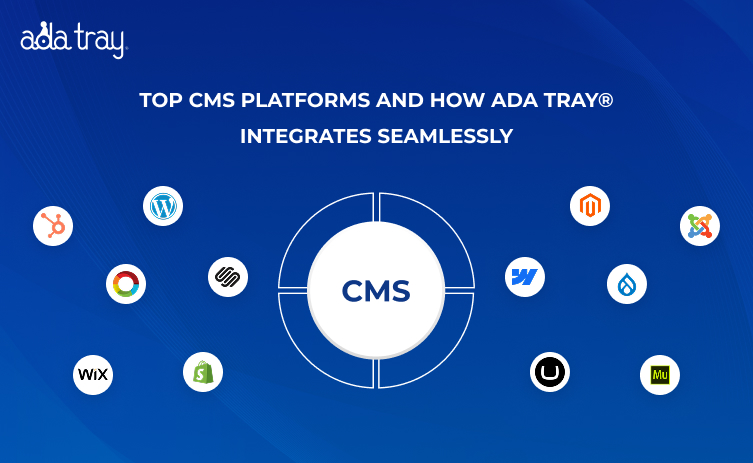
Popular CMS platforms include WordPress, Shopify, Drupal, Joomla, Wix, Squarespace, Webflow, HubSpot CMS, and many others. Each has its own strengths, user base, and ecosystem of third-party tools.
The choice of CMS directly impacts site performance, SEO, security, and — especially today — accessibility.
Over 1.3 billion people worldwide live with some form of disability, according to the World Health Organization. In the United States alone, approximately 26% of adults — one in four — experience a disability that can impact how they use the web.
Web accessibility means designing and developing websites so that people with visual, auditory, motor, cognitive, and neurological disabilities can access and interact with them fully. The Web Content Accessibility Guidelines (WCAG), published by the World Wide Web Consortium (W3C), provide a globally recognized framework for making the web inclusive.
From a purely ethical standpoint, an inaccessible website excludes tens of millions of potential visitors. From a legal standpoint, it opens businesses up to expensive ADA Title III lawsuits — including the now-infamous "click-by" lawsuits where serial plaintiffs target businesses for digital accessibility violations.
The good news? You don't have to rebuild your website or switch your CMS to become accessible. Solutions like ADA Tray® provide a rapid, reliable path to accessibility compliance — right inside the CMS you already love.
ADA accessibility lawsuits targeting websites have surged dramatically over the past several years. Hundreds of businesses — particularly in the hospitality, retail, and healthcare sectors — have faced legal action because their websites could not be used by individuals with disabilities.
Here is why CMS accessibility matters more than ever in 2026:
1. Legal Liability Is Real - The Department of Justice (DOJ) has affirmed that the ADA applies to websites. Businesses that ignore digital accessibility can face civil lawsuits, costly settlements, and reputational damage. ADA Tray® has helped multiple clients defeat or dismiss these claims, thanks in part to its Dedicated Accessibility Statement — a copyrighted legal tool that has been successfully used to counter serial plaintiff claims.
2. The User Base Is Enormous - People with disabilities represent a significant consumer segment with an estimated combined spending power of over $490 billion annually in the U.S. An inaccessible website is simply bad business.
3. Google Rewards Accessibility - Accessibility and SEO share many core principles — semantic HTML, clear navigation, fast load times, descriptive alt text. A more accessible website is typically a better-performing website in organic search results.
4. Inclusive Design Builds Brand Trust - Businesses that demonstrate a commitment to inclusion build stronger, more loyal customer relationships. Accessibility is increasingly a differentiator — and customers notice.
WordPress powers over 43% of all websites on the internet, making it by far the most widely used CMS. It offers an enormous library of plugins, themes, and developer resources. WordPress is highly flexible and scalable — from a personal blog to a complex enterprise site. However, accessibility depends heavily on the theme and plugins used, which is why adding a dedicated accessibility layer like ADA Tray® for WordPress is essential for true WCAG 2.1 conformity.
Shopify is the dominant CMS for e-commerce businesses, hosting millions of online stores worldwide. With built-in payment processing, inventory management, and a growing app marketplace, it's the go-to platform for retail brands of all sizes. E-commerce sites have a particular exposure to ADA lawsuits given their transaction-focused nature, making ADA Tray® for Shopify an essential addition for any online merchant.
Drupal is a powerful, enterprise-grade CMS known for its flexibility and strong security posture. It's the choice of governments, universities, and large corporations. Drupal has strong native accessibility features, but complex custom builds often introduce gaps. ADA Tray® complements Drupal's existing framework to provide a complete, user-facing accessibility layer.
Joomla occupies the middle ground between WordPress's ease of use and Drupal's power. It's a robust platform with a loyal developer community, popular among mid-sized organizations. Like most CMS platforms, Joomla's accessibility varies by template and configuration — making an overlay solution like ADA Tray® for Joomla a smart, plug-and-play complement.
HubSpot CMS is purpose-built for inbound marketing and combines website management with a powerful CRM. It's popular among B2B and SaaS companies seeking tight integration between their web presence and sales pipeline. ADA Tray® can be easily embedded into HubSpot-powered websites via a simple JavaScript snippet, ensuring marketing assets reach all audiences.
Wix is one of the most popular drag-and-drop website builders, beloved by small businesses, creatives, and entrepreneurs. Its ease of use is unmatched for non-technical users. ADA Tray® offers a dedicated Wix plugin, making accessibility compliance just as simple as the platform itself — no developer needed.
Squarespace is the preferred platform for design-forward brands — portfolios, boutique stores, restaurants, and lifestyle businesses. Beautiful templates come standard, but visual flair doesn't automatically mean accessibility compliance. ADA Tray® integrates cleanly with Squarespace websites, adding the assistive technology layer that transforms a beautiful site into an inclusive one.
Webflow is a favorite among professional web designers and agencies who want design freedom with clean code output. It has made strides in native accessibility tooling, but the flexibility it provides can also create accessibility inconsistencies across projects. ADA Tray® integrates with Webflow sites to provide a consistent, reliable accessibility experience across every build.
CMS Max is a lesser-known but capable content management platform used by hospitality businesses and regional enterprises. For businesses on niche CMS platforms like CMS Max, the JavaScript embed method offered by ADA Tray® makes integration frictionless — no platform-specific plugin required.
Though Adobe Muse has reached end-of-life, thousands of websites built on the platform remain active. These legacy sites are especially vulnerable to accessibility gaps. ADA Tray® provides a simple code-embed solution that modernizes the accessibility of even legacy Adobe Muse sites without requiring a full rebuild.
Umbraco is a .NET-based open-source CMS popular in European markets and enterprise environments. It offers developers significant customization flexibility. ADA Tray® can be embedded into Umbraco via JavaScript, making it an ideal accessibility partner for development teams working in the Microsoft ecosystem.
Magento (now Adobe Commerce) is an enterprise-level e-commerce platform for large-scale online retail operations. Sites built on Magento handle millions of transactions and attract diverse audiences — including users with disabilities. ADA Tray® provides a robust accessibility layer for Magento stores, ensuring every shopper can engage with your product catalog, checkout, and account management pages.
The best CMS platforms of 2026 understand that SEO and accessibility are deeply intertwined. Clean semantic HTML, proper heading hierarchies, descriptive alt text, and fast page speeds are equally important for search engine crawlers and users relying on assistive technologies. When businesses add ADA Tray® to their CMS, they simultaneously improve the user experience for visitors with disabilities and reinforce the structural signals that search engines reward.
Modern businesses do not have the luxury of month-long development sprints just to add a feature. The best CMS tools — and the best accessibility solutions — work right out of the box. ADA Tray® is designed precisely around this principle: subscribe, install a single line of JavaScript (or download the platform plugin), and your website immediately displays the ADA Tray® widget with its full suite of assistive tools. No coding expertise required. No disruption to your existing CMS workflow.
A CMS that cannot protect your data or grow with your business is not a CMS worth investing in. Similarly, an accessibility solution must be secure, privacy-conscious, and capable of handling high-traffic environments without degradation. ADA Tray® is GDPR-compliant, PCI DSS-aligned, and SSL-secured. Its Evergreen Technology model means the widget updates automatically — business owners never need to manually patch or upgrade their accessibility tools.
What sets ADA Tray® apart from competitors isn't just the depth of its accessibility features — it's the simplicity and universality of its integration model. Whether your website runs on WordPress, Shopify, Wix, Webflow, Squarespace, Drupal, or even custom HTML/CSS, ADA Tray® works.
The integration approach is built on two pathways:
1. JavaScript Embed (Universal) - ADA Tray® provides a single line of JavaScript code that can be placed in the "head" or "body" of any webpage. This method works with virtually any CMS or custom-built website — including legacy platforms, enterprise CMS systems, and custom-coded sites. Once the code is placed, the ADA Tray® widget is live instantly across the entire site.
2. Native CMS Plugins - For the most popular platforms, ADA Tray® offers dedicated plugins available directly from each platform's marketplace. These plugins handle the installation entirely within the CMS dashboard, making it accessible even to non-technical users.
ADA Tray® is also highly configurable post-installation. Business owners can choose their own icon design, widget placement on the screen, and which features are enabled or disabled — all through an easy-to-use real-time configuration panel.
Getting started with ADA Tray® is a three-step process:
Step 1 — Subscribe: Choose your plan and subscribe to ADA Tray®. A 30-day free trial is available, allowing you to experience the full power of the widget before committing.
Step 2 — Install: After subscribing, you will receive the JavaScript embed code to place on your website, or you can download the ADA Tray® plugin directly from your CMS marketplace (available for WordPress, Shopify, Wix, Webflow, Squarespace, and more).
Step 3 — Launch: Your website immediately displays the ADA Tray® widget. Visitors can now access the full suite of assistive tools — from keyboard navigation and screen reading to high-contrast modes and font adjustments — layered seamlessly over your existing design. No redesign. No downtime. No disruption.
The entire process can be completed in under ten minutes. That's the ADA Tray® promise.
Deploying ADA Tray® is a powerful step toward accessibility compliance, but holistic accessibility is a layered effort. Here are the industry best practices every CMS-powered website owner should follow in 2026:
1. Choose an Accessible Theme or Template - When selecting a theme or template for your CMS, look for those that advertise WCAG 2.1 AA compliance. A solid, accessible foundation reduces the remediation burden later.
2. Use Proper Heading Hierarchy - Structure your content with logical H1 → H2 → H3 heading levels. Screen readers and search engines alike depend on this structure to understand page content.
3. Write Descriptive Alt Text for All Images - Every image on your website should have descriptive alt text that communicates the image's content to someone who cannot see it. This is both an accessibility and an SEO requirement.
4. Ensure Keyboard Navigability - All interactive elements — menus, forms, buttons, modals — must be operable via keyboard alone. ADA Tray®'s Full Keyboard Navigation feature (activated via SHIFT+ key configurations) directly addresses this requirement.
5. Maintain Sufficient Color Contrast - Text must maintain adequate contrast against its background — at a minimum of 4.5:1 for normal text per WCAG 2.1 Success Criterion 1.4.3. ADA Tray® provides High Contrast, WCAG Contrast (Black & Yellow), Grayscale, and Invert filters that give users the ability to adjust contrast to their individual needs.
6. Caption All Video and Audio Content - Multimedia content must include captions for users who are deaf or hard of hearing and transcripts for audio-only content.
7. Publish a Dedicated Accessibility Statement - ADA Tray® includes a copyrighted Dedicated Accessibility Statement — a dynamic content tool controlled by a robust CMS — that helps demonstrate your commitment to accessibility and has been successfully used to counter legal claims. This is not just best practice; it's a strategic legal asset.
8. Conduct Regular Accessibility Audits - Accessibility is not a one-time project. Regular audits — using automated tools, manual testing, and user testing with people with disabilities — ensure your website remains compliant as content evolves. ADA Tray® also provides valuable user engagement data, showing which accessibility features your visitors use most.
The CMS you choose is the foundation of your digital presence. The accessibility solution you layer on top of it is the bridge that connects your website to every potential visitor — regardless of ability. In 2026, these two decisions are inseparable.
Every platform covered in this blog — from the ubiquitous WordPress to the enterprise-grade Magento — can be made meaningfully more accessible when paired with ADA Tray®. The patent-pending widget from INNsight delivers 35+ assistive features, WCAG 2.1 and Section 508 conformity support, a copyrighted Accessibility Statement, and Evergreen Technology that updates automatically — all for a price point that makes compliance accessible even for small businesses.
Investing in web accessibility is also an investment in your search engine performance. Here is why:
Websites running ADA Tray® aren't just checking a compliance box — they are actively improving the technical foundation that drives organic search visibility.
The risk of ignoring web accessibility in 2026 is simply too great. "Click-by" ADA lawsuits continue to target businesses, large and small. Legal defense costs, settlements, and reputational damage far outweigh the modest investment in a solution like ADA Tray®.
But the case for ADA Tray® goes beyond risk mitigation:
The question for every business owner in 2026 is no longer whether to make your CMS-powered website accessible. The question is how fast you can do it.
With ADA Tray®, the answer is: faster than you think.
Q: What CMS platforms does ADA Tray® support?
ADA Tray® supports all major CMS platforms, including WordPress, Shopify, Wix, Webflow, Squarespace, Drupal, Joomla, HubSpot CMS, Magento, Umbraco, and more. Any platform that allows JavaScript to be embedded in the page HTML is compatible with ADA Tray®.
Q: Does ADA Tray® make my website fully ADA compliant?
ADA Tray® significantly increases your website's conformity to WCAG 2.1, Section 508, and ADA Title III requirements by layering 35+ assistive technologies onto your existing site. It also provides a Dedicated Accessibility Statement that has been used to help defend against legal claims. For maximum compliance, ADA Tray® should be used alongside accessible design practices.
Q: How long does it take to install ADA Tray® on my CMS?
Installation typically takes under ten minutes. You can either add a single JavaScript snippet to your site's HTML or download the ADA Tray® plugin from your CMS marketplace (for WordPress, Shopify, Wix, Webflow, and Squarespace).
Q: Is ADA Tray® compliant with GDPR and data privacy regulations?
Yes. ADA Tray® is GDPR-compliant, PCI DSS-aligned, and SSL-secured. User engagement data collected by the widget is handled in accordance with applicable privacy regulations.
Q: Can I customize the appearance and behavior of ADA Tray® on my website?
Absolutely. ADA Tray® is highly configurable. You can choose the widget's icon, screen placement, and which features are enabled or disabled — all through a real-time configuration panel in your ADA Tray® dashboard.
Q: Does ADA Tray® work with custom-coded HTML/CSS websites?
Yes. Any website that allows custom JavaScript — including fully custom-coded HTML/CSS sites — can integrate ADA Tray® via the universal JavaScript embed method.
Q: How much does ADA Tray® cost?
ADA Tray® offers affordable subscription plans starting with a 30-day free trial.
Q: What accessibility features does ADA Tray® include?
ADA Tray® includes over 35 features: Full Keyboard Navigation, Audible Page Reader, Animation Freezer, Font Size & Zoom controls, High Contrast, Grayscale, Invert, WCAG Black & Yellow Contrast, Highlight Links & Titles, Black/White Cursor, Reader View, Tooltip Visible, Monochrome, Sepia, Bold Fonts, Remove Images, Text/Title Color Picker, Line/Word/Letter Spacing controls, Alignment options, and a built-in Help Guide.
Q: Can ADA Tray® help my business avoid ADA lawsuits?
ADA Tray® has helped shield multiple clients from ADA lawsuits and has provided forensic analysis that contributed to lawsuit dismissals. Its Dedicated Accessibility Statement is a key legal tool in this defense. While no solution can guarantee immunity from legal action, ADA Tray® significantly strengthens your accessibility posture and legal defensibility.
Q: Does ADA Tray® update automatically?
Yes. ADA Tray® is Evergreen Technology — updates are automatically pushed to your widget without any action required on your part.
Author
Raj Patel
CEO & Founder
Raj Patel, the driving force at INNsight, is changing the game for hotels with his real-world expertise in software and digital marketing. Drawing on his Silicon Valley experience at eBay, Raj keeps things practical. Think of practical tools that work, making hotels shine online and turning digital success for every hotel. Jump on board the INNsight journey, where Raj's hands-on approach brings a touch of reality to revolutionizing the hospitality scene.
Follow him on LinkedIn - www.linkedin.com/in/rajbpatel
 Related Blogs


This website uses cookies to deliver our services and to show you relevant inventory, property details, and rates for . By using our website, you acknowledge that you have read and understand our Cookie Policy, Privacy Policy, and our Terms of Service. Your use of 's services, including the booking of online reservations, is subject to these policies and terms.

 4
4
These Cookies are strictly necessary to provide you with services available through our websites and to use some of its features, such as access to secure areas and to book accommodations.
These Cookies are used to enhance the performance and functionality of our websites but are non-essential to their use. However, without these Cookies, certain functionality (like videos) may become unavailable.
6
These Cookies collect information that is used either in aggregate form to help us understand how our websites are being used or how effective our marketing campaigns are, or to help us customize our websites for you.
2
These Cookies are used to make advertising messages more relevant to you. They perform functions like preventing the same ad from continuously reappearing, ensuring that ads are properly displayed for advertisers, and in some cases selecting advertisements that are based on your interests.
2
These Cookies are used to enable you to share pages and content that you find interesting on our websites through third-party social networking and other websites. These Cookies may also be used for advertising purposes, too.
What Are Cookies?
Cookies are small data files that are placed on your computer or mobile device when you visit a website. Cookies are widely used by website owners in order to make their websites work, or to work more efficiently, as well as to provide reporting information.
Cookies set by the website owner are called “first party cookies.” cookies set by parties other than the website owner are called “third party cookies.” Third party Cookies enable third party features or functionality to be provided on or through the website (e.g. like advertising, interactive content, analytics, etc….). The parties that set these third party Cookies can recognize your computer both when it visits the website in question and also when it visits certain other websites.
Why Do We Use Cookies?
We use first and third party Cookies for several reasons. Some Cookies are required for technical reasons in order for our websites to operate, and we refer to these as “strictly essential” or "strictly necessary” Cookies. Other Cookies also enable us to track and target the interests of our users to enhance the experience on our website. Third parties serve Cookies through our website for advertising, analytics, and other purposes.
The law states that we can store cookies on your device without prior consent for strictly essential or strictly necessary cookies. For all other types of cookies we need your permission. You can at any time accept, reject, or change the cookie settings on this website at any time by clicking on the cookie settings link.