In simple terms, WCAG stands for Web Content Accessibility Guidelines. The most crucial regulation defines whether or not your website is convenient enough for all users, mainly focusing on specially-abled individuals.
There have been four breakdowns of the regulation. The latest version, i.e., WCAG 2.1, states that your WCAG 2.1 compliance website should be accessible to all individuals, and the screen size shouldn’t be an issue. The version primarily highlights the need to improve website content for individuals with cognitive impairments and ensure website responsiveness.
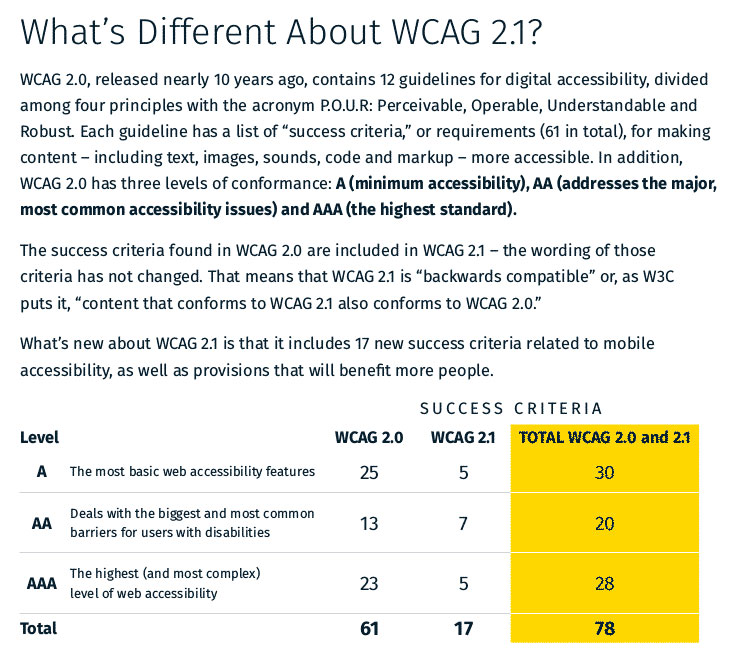
To better understand the differences between WCAG 2.0 and WCAG 2.1, here’s a snippet of the various pointers these two versions highlight.
Did you know that WCAG was initially developed by W3C (World Wide Web Consortium)? Nearly several years have passed since the WCAG version was introduced. But every word related to the law here states that any website requires accessibility measures.
Website accessibility depends upon the texture of content. According to WCAG accessibility standards, the content needs to be understandable to anyone, regardless of nationality, awareness of the subject matter, or having some physical deficiencies.
The website undergoes multiple test levels to determine if it is a WCAG-compliant website. Like a science experiment, the website undergoes rigorous testing to ensure it meets public standards.
Once the test is over, the website has a compliance score, i.e., “Success Criteria.” This score defines on what level the website is suitable for website accessibility. The three WCAG Compliance levels are A, AA, and AAA. All these levels imply the difficulty and challenge mode of accessibility.
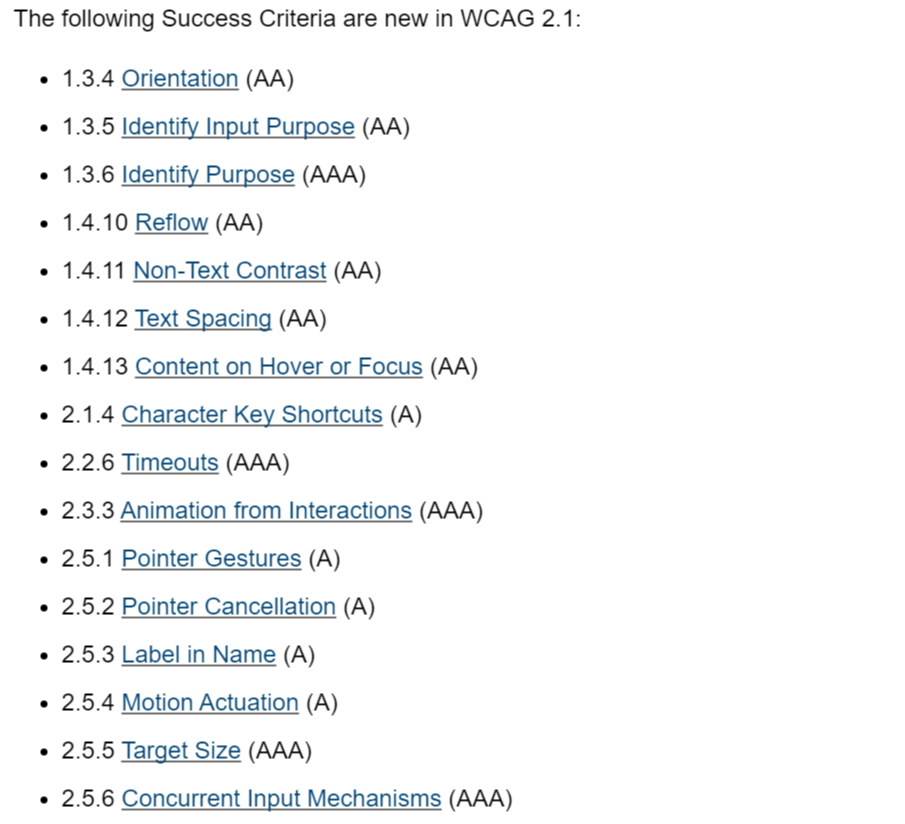
Here’s a glimpse at the latest additions to Success Criteria for WCAG 2.1
To meet all these criteria, the W3C features specific principles for certification as a website accessibility compliant. In simple terms, look at the measures to pass the tests.
There have been many changes made during the development of WCAG 2.1 compliance, mainly concerning the number of principles. However, according to W3C, they have created a checklist that is an endless maze of instructions and guidelines.
To ease the process, W3C has stated at the very beginning of version WCAG 2.1 that, despite numerous additions, the basic requirements remain the same four principles.
So, without further ado, let’s dive into what these four principles talk about and how your website can become a WCAG compliant website.

The principle addresses the word “perceive,” as in ‘the ability to make sense of things.’ A user must understand the content or any matter presented on the website. The subject matter should be convenient enough for all the primary senses we use to perceive, i.e., vision and sound.
To make a website “perceivable,” try to address the content in a layman's language. If the website has graphics, add captions for videos wherever necessary. Another factor that plays a role in making content understandable includes font, spacing, color, and text size.

Many individuals have mobility difficulties, especially people with injured limbs or who have survived paralysis or stroke. For these individuals, using an ordinary mouse becomes a tedious job. To address this issue, the principal draws attention to how to access the website.
This principle focuses on elevating your keyboard into a mouse. For instance, we use Ctrl Z to undo an error; similarly, it focuses on managing the functionality of a mouse on the various keys through keyboard shortcuts.

One needs to be aware that not everyone can retrospect the technical content portrayed on the screen. Phew! This sentence made very little sense, didn’t it?
The principle brings attention to this exact issue. The content on your website should be readable to anyone, especially if it provides instructions or includes many technical terms. Try to simplify the language on a fundamental level so people from various backgrounds or countries can easily understand what is being presented.
As we discussed technicalities, we found that content is provided on a website in various ways. Just as we live in a diversified community with multiple languages, our content is built on a multifaceted language.
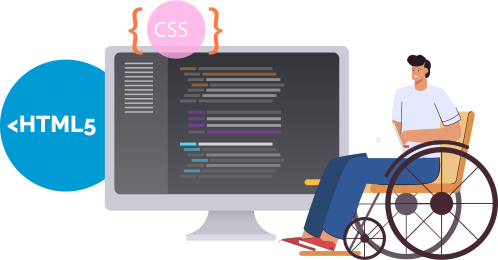
The principle gestures that any content you put on the website must be coded in the primary language, i.e., HTML or CSS. These two code languages are permitted, as people with disabilities can easily manage and browse the website.


This website uses cookies to deliver our services and to show you relevant inventory, property details, and rates for . By using our website, you acknowledge that you have read and understand our Cookie Policy, Privacy Policy, and our Terms of Service. Your use of 's services, including the booking of online reservations, is subject to these policies and terms.

 4
4
These Cookies are strictly necessary to provide you with services available through our websites and to use some of its features, such as access to secure areas and to book accommodations.
These Cookies are used to enhance the performance and functionality of our websites but are non-essential to their use. However, without these Cookies, certain functionality (like videos) may become unavailable.
6
These Cookies collect information that is used either in aggregate form to help us understand how our websites are being used or how effective our marketing campaigns are, or to help us customize our websites for you.
2
These Cookies are used to make advertising messages more relevant to you. They perform functions like preventing the same ad from continuously reappearing, ensuring that ads are properly displayed for advertisers, and in some cases selecting advertisements that are based on your interests.
2
These Cookies are used to enable you to share pages and content that you find interesting on our websites through third-party social networking and other websites. These Cookies may also be used for advertising purposes, too.
What Are Cookies?
Cookies are small data files that are placed on your computer or mobile device when you visit a website. Cookies are widely used by website owners in order to make their websites work, or to work more efficiently, as well as to provide reporting information.
Cookies set by the website owner are called “first party cookies.” cookies set by parties other than the website owner are called “third party cookies.” Third party Cookies enable third party features or functionality to be provided on or through the website (e.g. like advertising, interactive content, analytics, etc….). The parties that set these third party Cookies can recognize your computer both when it visits the website in question and also when it visits certain other websites.
Why Do We Use Cookies?
We use first and third party Cookies for several reasons. Some Cookies are required for technical reasons in order for our websites to operate, and we refer to these as “strictly essential” or "strictly necessary” Cookies. Other Cookies also enable us to track and target the interests of our users to enhance the experience on our website. Third parties serve Cookies through our website for advertising, analytics, and other purposes.
The law states that we can store cookies on your device without prior consent for strictly essential or strictly necessary cookies. For all other types of cookies we need your permission. You can at any time accept, reject, or change the cookie settings on this website at any time by clicking on the cookie settings link.